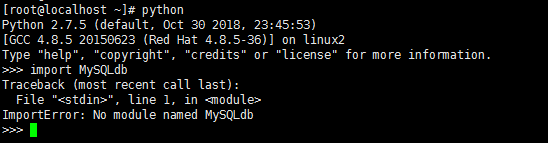
1、电脑已经安装好CentOS7虚拟机,虚拟机安装了MariaDB和Python2.7,尝试连接数据库,要引入MySQLdb包,命令如下:
python
import MySQLdb
因为包不存在,报错
2、使用pip包管理工具安装MySQLdb包,命令如下:
pip install MySQL-python
报错如下:
Command "python setup.py egg_info" failed with error code 1 in /tmp/pip-build-XoICH7/MyS
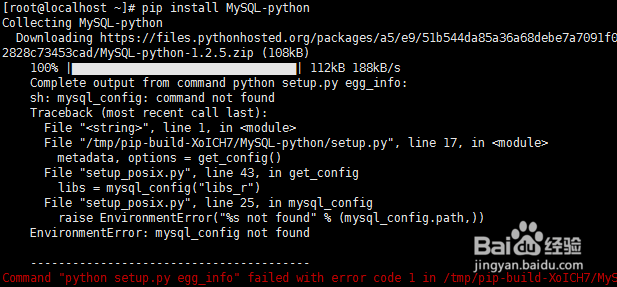
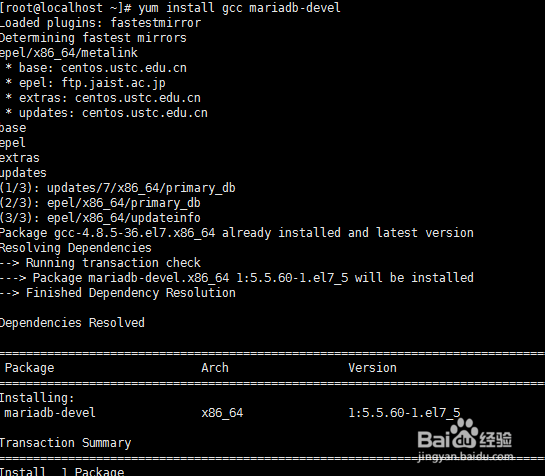
3、报错原因是缺少依赖包mariadb-devel,使用yum安装命令如下:
yum install gcc mariadb-devel
注意没有使用 -y 安装过程会有一个提醒,输入y即可
4、再次输入python,进入python交互环境,输入
import MySQLdb
就不会报错了

5、创建一个数据库连接,代码如下:
import MySQLdb
conn = MySQLdb.connect(host='192.168.128.25',user='root',passwd='yourpassword',db='mysql')
将passwd换成数据库的密码

6、执行查询语句,代码如下:
cur = conn.cursor()
re = cur.execute('select * from user ')
print (re)
返回的是查询结果集的数量
