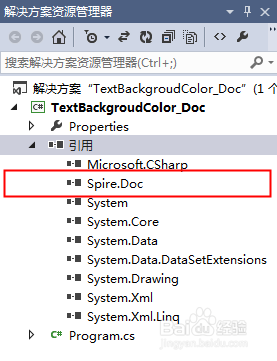
1、可通过E-iceblue或Nuget官网下载安装Free Spire.Doc for .NET后,注意在项目程序中添加引用Spire.Doc.dll(dll文件可在安装路径下的Bin文件夹中获取)。
1、using Spire.Doc;
using Spire.Doc.Documents;
using Spire.Doc.Fields;
using System.Drawing;
namespace TextBackgroudColor_Doc
{
class Program
{
static void Main(string[] args)
{
//创建Document实例并加载示例文档
Document document = new Document();
document.LoadFromFile("test.docx");
//获取第1段落,并为其设置底色
Paragraph paragaph = document.Sections[0].Paragraphs[0];
paragaph.Format.BackColor = Color.YellowGreen;
//为第2段里查找的特定文字添加底色
paragaph = document.Sections[0].Paragraphs[1];
TextSelection selection = paragaph.Find("江户川乱步奖", false, true);
TextRange range = selection.GetAsOneRange();
range.CharacterFormat.TextBackgroundColor = Color.Yellow;
//保存文档
document.SaveToFile("result.docx", FileFormat.Docx);
System.Diagnostics.Process.Start("result.docx");
}
}
}
2、完成代码后,调试程序,生成文档。文档效果如下:
