delphi怎么打开excel文件读取数据?

时间:2026-02-14 02:38:43

1、新建窗口应用程序后,在窗口中分别增加一个adoconnection、adoquery、datasource控件。

delphi怎么打开excel文件读取数据?

2、接着添加一个文件打开对话框控件和一个普通按钮。

delphi怎么打开excel文件读取数据?

3、设置文件打开对话框控件的filter属性,过滤只打开excel文件。

delphi怎么打开excel文件读取数据?

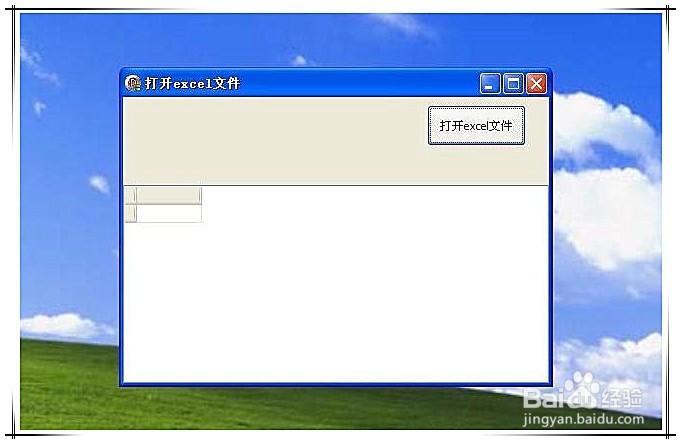
4、运行效果如下图所示。

delphi怎么打开excel文件读取数据?

delphi怎么打开excel文件读取数据?

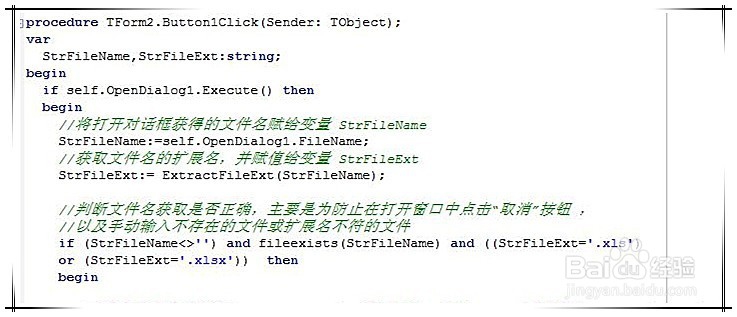
5、双击按钮,添加以下代码。首先是要注意对opendialog获得的文件名进行判断,确保打开的文件确定是excel文件。

delphi怎么打开excel文件读取数据?

delphi怎么打开excel文件读取数据?

6、然后是adoconnection控件的连接字符串的生成方法。

delphi怎么打开excel文件读取数据?

7、最后是要利用好try ……except功能,来对不符合导入模板格式的excel进行报错处理。

delphi怎么打开excel文件读取数据?

© 2026 五度知识库
信息来自网络 所有数据仅供参考
有疑问请联系站长 site.kefu@gmail.com