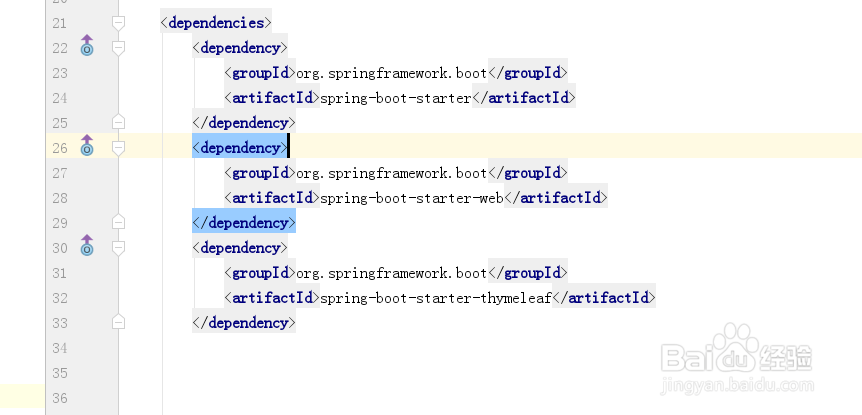
1、第一步:从https://start.spring.io/上面下载一个springboot的maven项目,解压后导入到IDEA或eclipse,在pox.xml添加以下代码:
<dependency>
<groupId>org.springframework.boot</groupId>
<artifactId>spring-boot-starter</artifactId>
</dependency>
<dependency>
<groupId>org.springframework.boot</groupId>
<artifactId>spring-boot-starter-web</artifactId>
</dependency>
<dependency>
<groupId>org.springframework.boot</groupId>
<artifactId>spring-boot-starter-thymeleaf</artifactId>
</dependency>
2、第二步:在项目的resources里面添加static和templates目录,如图:

3、第三步:在配置文件application.properties里面配置thymeleaf,代码如下:
# templates文件夹的路径
spring.thymeleaf.prefix=classpath:/templates/
# templates中的所有文件后缀名
spring.thymeleaf.suffix=.html

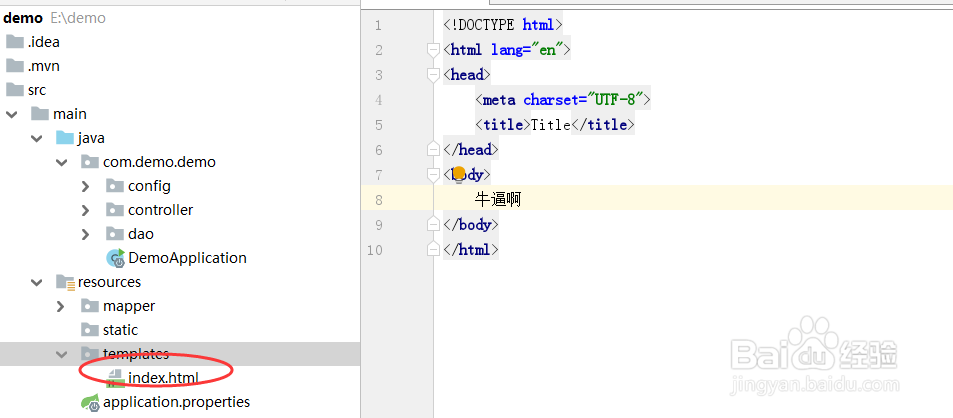
4、第四步:在templates的目录里面新建一个index.html文件,如图:
5、第五步:新建一个控制器,代码如下:
@RequestMapping("/index")
public String index(){
return "index";
}

6、第六步:启动项目并访问htttp://localhost:8080/index,会出现index.html的内容,如图:

7、第七步:这里是简单的一个页面,一个网站就是由很多单个页面组成的,所以这也是一个简单网站