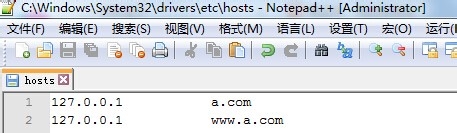
1、进入C:\Windows\System32\drivers\etc,建议使用notepad++打开hosts文件
如图:

2、打开后,在hosts文件里添加自己的域名
如图:
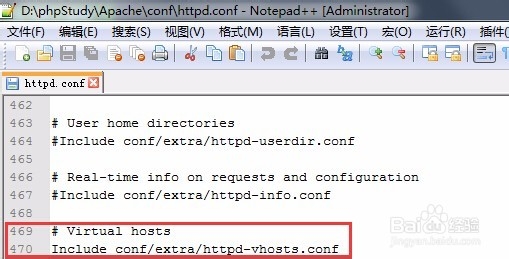
3、再进入apache下的安装目录D:\phpStudy\Apache\conf,打开httpd.conf文件
,去掉Include conf/extra/httpd-vhosts.conf前面的#
如图:
4、再进入D:\phpStudy\Apache\conf\extra,打开httpd-vhosts.conf文件,在尾部加上
D:\phpStudy\Apache\conf\extra\httpd-vhosts.conf
<VirtualHost *:80>
DocumentRoot "D:/phpStudy/WWW"
ServerName localhost
</VirtualHost>
<VirtualHost *:80>
#这里说明在D:/phpStudy/WWW/下要有一个a文件夹,源代码放a文件夹里,绑上了hosts文件里设置的a.com
DocumentRoot "D:/phpStudy/WWW/a"
ServerName a.com
</VirtualHost>
<VirtualHost *:80>
DocumentRoot "D:/phpStudy/WWW/a"
ServerName www.a.com
</VirtualHost>