python中如何将数据保存到excel表格中?

时间:2026-02-12 12:22:41

1、1.打开pycharm,新建一个python file。

python中如何将数据保存到excel表格中?

2、2.利用import导入openpyxl模块。

python中如何将数据保存到excel表格中?

3、3.调用openpyxl模块中的Workbook()方法。

python中如何将数据保存到excel表格中?

4、4.新建一个excel文件,并且在单元表为"sheet1"的表中写入数据。

python中如何将数据保存到excel表格中?

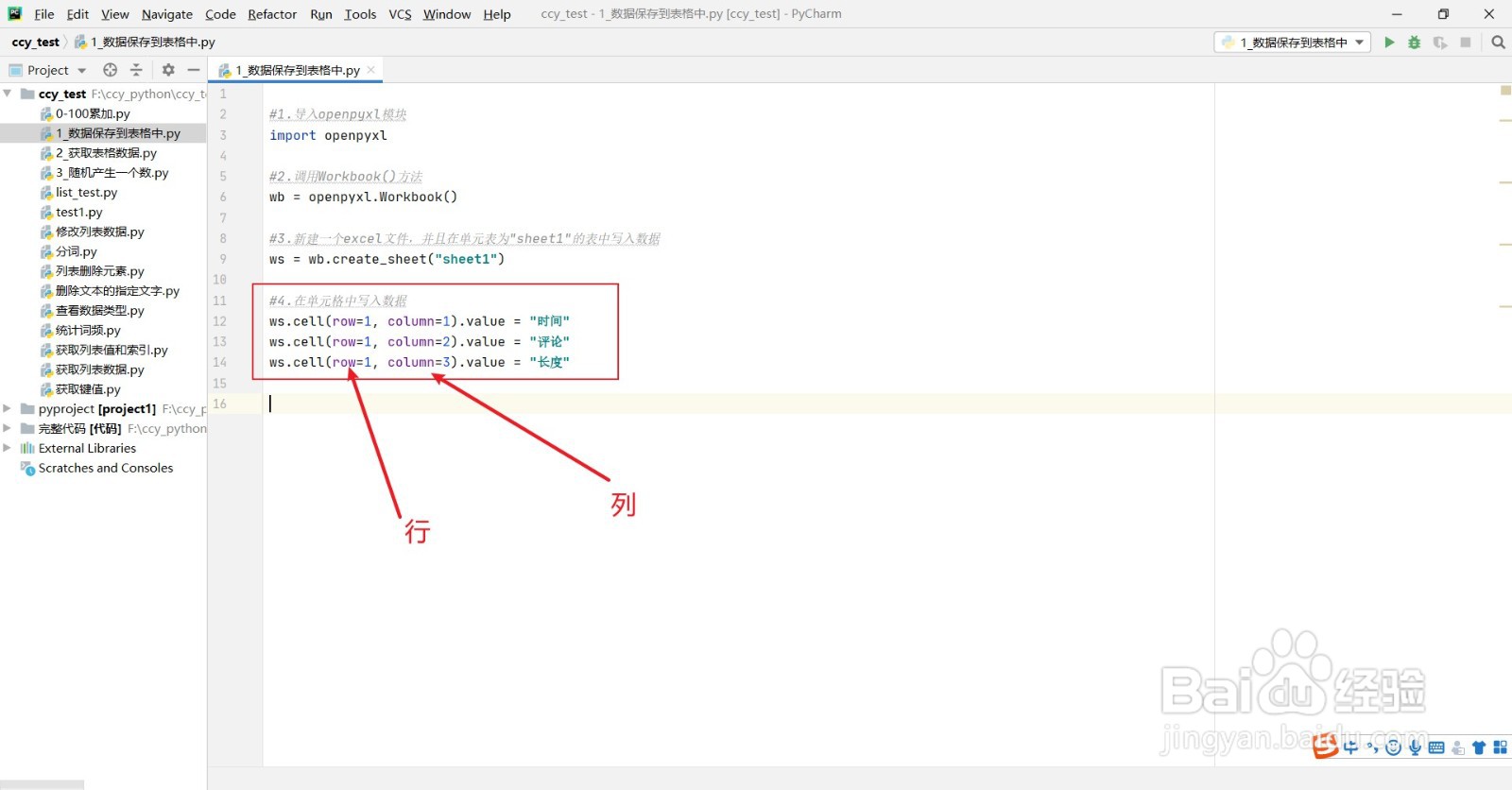
5、5.利用cell(行,列).value来将数据写入每一个单元格中。

python中如何将数据保存到excel表格中?

6、6.利用save( filename),来保存文件,filename为文件名。

python中如何将数据保存到excel表格中?

7、7.运行一下代码,可以看到当前文件中新建了一个excel表格。

python中如何将数据保存到excel表格中?

8、8.打开表格可以看到数据被写进去了。

python中如何将数据保存到excel表格中?

© 2026 五度知识库
信息来自网络 所有数据仅供参考
有疑问请联系站长 site.kefu@gmail.com