1、打开VB。

2、绘制控件:TextBox,PictureBox,Label,CommandButton。
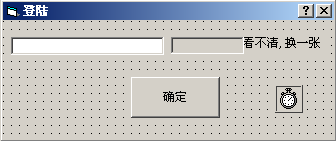
3、添加代码:
Dim vCode As String
Private Sub drawvc() '显示校验码
Dim i, vc, px, py As Long
Dim r, g, b As Byte
Randomize '初始化随机种子
'生成随机校验码
vc = CLng(8999 * Rnd + 1000)
vCode = vc
'显示校验码
Picture1.Cls
Picture1.Print vc
'添加噪点(防止自动图像识别)
For i = 0 To 2000 '画2000个噪点
'画点随机位置
px = CLng(Picture1.Width * Rnd)
py = CLng(Picture1.Height * Rnd)
'画点随机颜色
r = CByte(255 * Rnd)
g = CByte(255 * Rnd)
b = CByte(255 * Rnd)
Picture1.Line (px, py)-(px + 1, py + 1), RGB(r, g, b)
Next
End Sub
Private Sub Label1_MouseDown(Button As Integer, Shift As Integer, X As Single, Y As Single)
drawvc
End Sub
Private Sub Command2_Click()
If Text1.Text = vCode Then
MsgBox "验证码正确。", vbInformation + vbSystemModal, "正确"
frmLand.MousePointer = 13
Timer1.Enabled = True
Else
MsgBox "验证码错误。", vbCritical + vbSystemModal, "错误"
Text1.Text = ""
drawvc
End If
End Sub
Private Sub Form_Load()
Picture1.FontSize = 12
Picture1.FontBold = True
Picture1.AutoRedraw = True
drawvc
End Sub
4、完成。